MCP features, and how a group repo codes them
Everything a Ramen worker serves comes from one git repo per group. You write plain Python and JSON under mcp/;
the Rust node speaks the protocol (Streamable HTTP and gRPC, MCP 2026-07-28 and 2025-06-18 on one endpoint) and the
Python runtime runs your code. This page walks every capability, says what a client sees, and shows how the demo repo
ramen-demo-mcp-group codes it. The file-by-file contract is
The MCP repo; the wire details are on Transport.
mcp/
  requirements.txt                      pip requirements (baked into the group's image on a cloud deploy)
  env.yaml                              environment for tool code; {{$group.SECRET}} references
  tools/<name>/<name>.py + <name>.json  tools
  resources/<name>/<name>.py + .json    resources and resource templates
  prompts/<name>/<name>.json            prompts: a SKILL.md + settings.json, or a Python callable
  apps/<name>/index.html + app.yaml     MCP Apps (ui://)
  skills/<name>/SKILL.md                Skills over MCP (skill://)
  tests.yaml                            golden cases, run on the canary of every deploy
  guardrails.yaml + guardrails/         per-tool rails (NeMo or your own policy.py)
  evals/promptfooconfig.yaml            promptfoo evals, run after the golden cases
  skillspector-baseline.yaml            reviewed SkillSpector findings (optional)
  llm-config/manifest.yaml + fragments  client configs every member accepts at sign-in
Rules that hold everywhere: the folder name, the JSON name and the file stem agree; the JSON type matches the
folder (tool, resource, prompt); every file above is optional. A deploy syncs the repo
to the group's bucket prefix, starts a canary, reloads, runs the golden cases, evals and scan, then rolls stable
(Deploy your first group).
Which protocol features, at a glance
| Capability | Wire | Coded in the repo as | Era |
|---|---|---|---|
| Tools with input and output schemas | tools/list, tools/call |
tools/<name>/ JSON + Python |
both |
| Resources, binary resources | resources/list, resources/read |
resources/<name>/, a callable returning str or bytes |
both |
| Resource templates | resources/templates/list |
a uri containing {var} |
both |
| Prompts | prompts/list, prompts/get |
SKILL.md + settings.json, or "callable" |
both |
| Completion | completion/complete |
an enum on a prompt argument or template variable |
both |
| Content blocks, progress | content[], notifications/progress |
text(), image(), audio(), resource(), progress() |
both |
| Multi round-trip requests (elicitation, sampling, roots) | resultType: input_required + requestState |
raise InputRequired(...) |
2026-07-28 |
| Tasks | io.modelcontextprotocol/tasks, tasks/get\|update\|cancel |
"task": true |
2026-07-28 |
| Subscriptions | subscriptions/listen (SSE) |
nothing: the worker sends list_changed after a reload |
2026-07-28 |
| Standard headers | Mcp-Method, Mcp-Name, Mcp-Param-* |
"header": "<Name>" on a tool parameter |
2026-07-28 |
| Server discovery | server/discover |
nothing: capabilities and extensions follow what loaded | 2026-07-28 |
| MCP Apps | io.modelcontextprotocol/ui, ui://<group>/<name> |
apps/<name>/index.html, "ui" on a tool |
2026-07-28 |
| Skills over MCP | io.modelcontextprotocol/skills, skills/list, skill:// |
skills/<name>/SKILL.md |
2026-07-28 |
A 2025-06-18 client is answered as before on the same endpoint; a feature that needs the newer era tells it so with a tool error rather than failing silently (what an older client sees).
Tools
A tool is a function plus a JSON file that describes it. The demo's calculator:
{
  "type": "tool",
  "name": "demo_calculator_tool",
  "description": "Add, subtract, multiply or divide two numbers and return the result as a number. ...",
  "callable": "calculator_func",
  "input": {
    "var1": {"type": "number", "description": "first operand (left-hand side); any finite number"},
    "var2": {"type": "number", "description": "second operand (right-hand side); must be non-zero for divide"},
    "func": {"enum": ["add", "subtract", "multiply", "divide"], "description": "operation to apply as var1 <func> var2"}
  },
  "output": {"type": "number", "description": "var1 <func> var2"},
  "error": {"type": "string"}
}
import calculator_utils as cu          # mcp/tools/demo_calculator_tool/utils/ is on sys.path

def calculator_func(var1: float, var2: float, func: str) -> float:
    ops = {"add": cu.add, "subtract": cu.sub, "multiply": cu.mul, "divide": cu.div}
    if func not in ops:
        raise ValueError(f"unknown func {func!r}; expected one of {sorted(ops)}")
    return ops[func](var1, var2)
input becomes the MCP inputSchema; output becomes outputSchema and the worker validates every result
against it. An exception is a tool error (isError: true) with the message, never a stack trace. Return any JSON
value: an object becomes structuredContent as well as text (the demo's word_count, the Iris tools).
The Iris tools show a data tool with pandas (mcp/requirements.txt pins it; a cloud deployment with the builder bakes
it into the group's worker image, see Worker images):
{"type": "tool", "name": "iris_group_means", "callable": "group_means", "ui": "iris_chart",
 "input": {"by": {"enum": ["species"], "description": "the column to group by; only species is categorical"}},
 "output": {"type": "object", "properties": {"by": {"type": "string"}, "counts": {"type": "object"},
            "groups": {"type": "object"}}, "required": ["by", "counts", "groups"]}}
Since 0.7.2 the group page decides per environment which roles or keys may list and call each tool
(tool access); the node enforces it, so a hidden tool is simply absent from
tools/list and a call is Unknown tool (2025-06-18: tool not found).
Resources and templates
{"type": "resource", "name": "iris_csv", "uri": "ramen://demo/iris.csv", "mime_type": "text/csv",
 "description": "The public-domain Iris data set ...", "callable": "read_csv", "input": {},
 "output": {"type": "string"}, "error": {"type": "string"}}
from pathlib import Path

def read_csv() -> str:
    return (Path(__file__).resolve().parent / "iris.csv").read_text(encoding="utf-8")
A callable that returns bytes is served as a base64 blob. A uri containing {var} is a template: listed by
resources/templates/list, matched on read, the variables passed as keyword strings and declared in input. The demo
repo has no template; the shape, from Ramen's conformance fixtures:
{"type": "resource", "name": "bowl_recipe", "callable": "read", "uri": "ramen://bowl/{flavour}/recipe",
 "mime_type": "text/plain", "input": {"flavour": {"enum": ["shoyu", "shio", "miso", "tonkotsu"]}}}
An enum on a template variable is what completion/complete suggests. Details:
a resource template.
Prompts
A prompt is either an agent-skills style SKILL.md with a settings.json, or a Python callable. The demo's
iris_analysis is the first kind:
{"type": "prompt", "name": "iris_analysis",
 "description": "Guide an agent through the Iris data with the three iris_* tools ...",
 "input": {"question": {"type": "string", "description": "what the user wants to know about the Iris data"}},
 "skill": "SKILL.md", "settings": "settings.json"}
{"allowed_tools": ["iris_describe", "iris_outliers", "iris_group_means"], "max_tool_calls": 6,
 "boundaries": ["never fabricate numbers: every figure comes from a tool result", "Iris data only; no other data set"]}
A callable prompt names "callable" instead of "skill" and returns a string, a content block or a list of
{"role", "content"} messages (a callable prompt). A {{$group.VAR}} reference
is never resolved in a prompt argument, because the answer goes back to the client.
Content blocks and progress
A tool may return one block or a list (text("…"), image(png_bytes, "image/png"), resource(uri, text=…)).
progress(n, total=…, message=…) is a no-op unless the client sent a progressToken and accepts SSE. The demo's
slow_report reports progress once a second (progress).
Multi round-trip requests: tools that ask
A 2026-07-28 tool can stop and ask the client for something, then run again from the top with the answer. There is no
session: the worker hands the client a signed requestState (HMAC bound to the caller, group, zone, tool and
arguments) and checks it on the retry. The demo's confirm_delete_note:
from ramen_runtime import InputRequired, elicit, input_responses

CONFIRM = {"type": "object", "properties": {"confirm": {"type": "boolean", "title": "Delete it?"}},
           "required": ["confirm"]}

def confirm_delete(note: str) -> str:
    answer = input_responses().get("confirm")
    if answer is None:
        raise InputRequired({"confirm": elicit(f'Delete the note "{note}"? This cannot be undone.', CONFIRM)})
    confirmed = answer.get("action") == "accept" and (answer.get("content") or {}).get("confirm") is True
    ...
The other builders are elicit_url(message, url), sample(messages, max_tokens=…) and list_roots(). A form that
asks for a field named like a credential (password, token, api_key, …) is refused; use elicit_url. Guardrail
pre-rails run on every round, post-rails on the final result. A golden case can drive both rounds:
  - name: confirm_delete_note deletes when the user confirms
    tool: confirm_delete_note
    args: {note: todo}
    respond: {confirm: {action: accept, content: {confirm: true}}}
    expect: {text_contains: 'Deleted the note "todo"'}
Full flow and limits: Multi round-trip requests.
Tasks
"task": true on a tool lets a client that declared the tasks extension get a task id at once and poll; any other
client waits for the answer as usual. The demo's slow_report:
{"type": "tool", "name": "slow_report", "callable": "report", "task": true,
 "input": {"seconds": {"type": "integer", "description": "how long the report takes, in seconds"}}}
import time
from ramen_runtime import progress

def report(seconds: int) -> str:
    seconds = max(0, min(int(seconds), 30))
    for done in range(seconds):
        progress(done, total=seconds, message=f"section {done + 1} of {seconds}")
        time.sleep(1)
    return f"Report ready after {seconds} s."
A task is bound to its caller, lives for RAMEN_TASK_TTL_SECS (3600) and is answered by any pod of the zone when
the zone has a Redis; without one a worker answers task tools synchronously and does not advertise the extension,
because a poll could reach the other pod. Details: Tasks.
Subscriptions and discovery
Nothing to code. A 2026-07-28 client may hold subscriptions/listen open (SSE) and gets
notifications/{tools,prompts,resources}/list_changed after a deploy changes what the zone serves.
server/discover answers the supported versions and capabilities, and lists an extension (tasks, ui, skills)
only while something loaded uses it. Lists carry ttlMs and cacheScope: "private" because they vary by caller.
See Transport → server/discover and subscriptions.
Standard headers
On the 2026-07-28 HTTP wire every request carries Mcp-Method (and Mcp-Name for a named call), so a load balancer
can route on them. A tool parameter may also be mirrored into a header:
The worker refuses a call whose header disagrees with the body (-32020). Adding or renaming a header is a
breaking change for the deploy's schema gate. A parameter mirrored in a header.
MCP Apps
An app is one HTML page a host renders in a sandbox next to a tool's result. The worker serves it as the resource
ui://<group>/<name> (mimeType: text/html;profile=mcp-app), and a tool that names it with "ui" carries
_meta["ui/resourceUri"] in tools/list and on every result.
title: Iris group means
description: Inline SVG bar chart of the per-species means that iris_group_means returns.
mcp/apps/iris_chart/index.html is self-contained (inline script and styles, no network, so no csp allowlist): it
listens for the host's ui/notifications/tool-result message and draws the groups of the result as bars.
iris_group_means points at it with "ui": "iris_chart". Limits: one index.html ≤ 512 KiB; app.yaml knows only
title, description and csp (connectDomains, resourceDomains); a tool whose ui names no loaded app fails
to load. SkillSpector reads the HTML as part of the group's skill text.
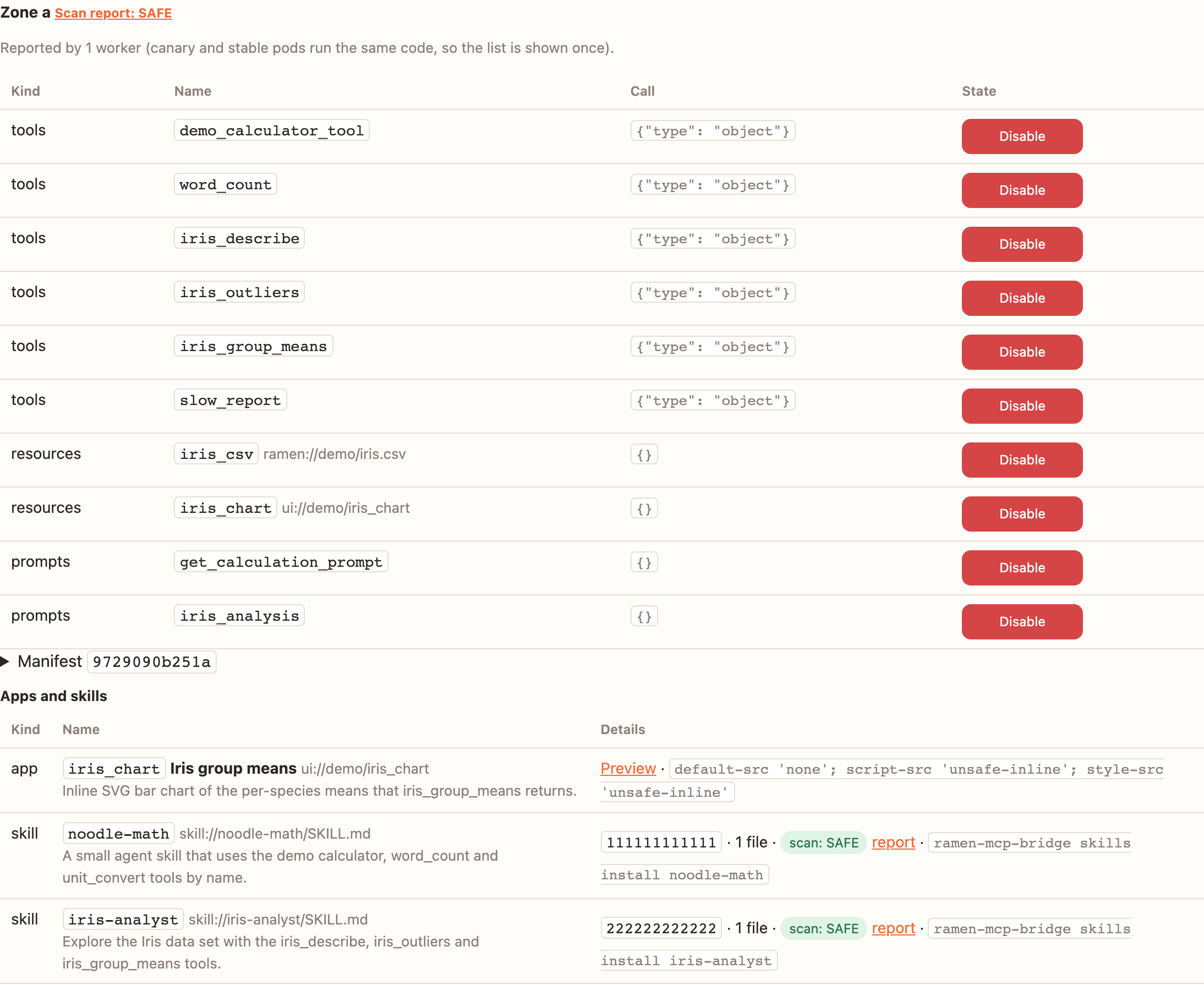
The console's group page lists each zone's apps and opens a preview: the page read from a worker of that zone and
shown in <iframe sandbox="allow-scripts" credentialless> under the app's own CSP — no cookies, no storage, no
access to the console page.
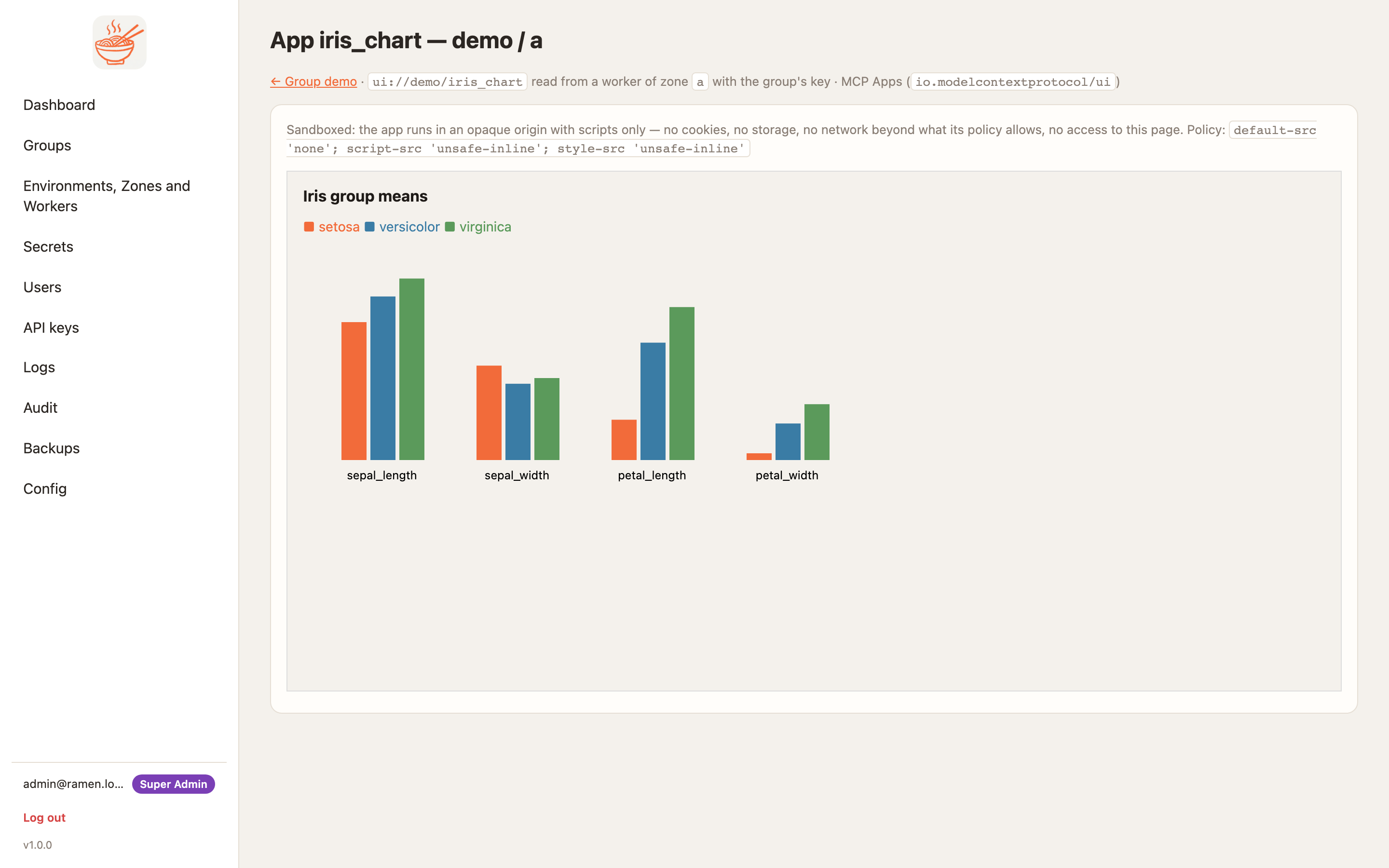
ui://demo/iris_chart, sandboxed. (The seeded screenshot console serves a static stand-in drawn from the Iris species means; the real app draws the same chart from the tool result a host posts it.)Skills over MCP
A skill is a folder with a SKILL.md an agent can install locally. Over MCP it is the
io.modelcontextprotocol/skills extension: skills/list answers each skill's name, description, version (a hash of
its files) and file list, and resources/read of skill://<name>/<path> returns a file.
---
name: iris-analyst
description: Explore the Iris data set with the demo group's iris_describe, iris_outliers and iris_group_means tools
  and report what they return, nothing more.
---
1. Start with `iris_describe` for the row count and per-column mean, std, min and max.
2. For "unusual" values call `iris_outliers` with the column and `z` 2.5 ...
4. Quote numbers exactly as the tools return them.
A skill is gated like a tool named skills:<name> (tool access and blocking apply). The bridge installs one with
ramen-mcp-bridge skills install <name> into ~/.claude/skills/<name>/, after a SkillSpector scan when the group
requires it. Every deploy scans the repo's skills and a skill synthesized from what the zone serves
(SkillSpector scans).
Environment and secrets
DEMO_MODE: demo
IRIS_MAX_ROWS: "{{$demo.IRIS_MAX_ROWS}}"     # a group secret; unset = the tool's default of 50
The worker renders this file at load and exports each key to the runtime, so os.environ["IRIS_MAX_ROWS"] holds the
secret's value. Values are never logged; a name starting RAMEN_ fails the deploy at sync (the judge credentials
cannot be overridden from a repo). Secrets can also be referenced inline as {{$group.NAME}} in tool arguments
(Secrets).
Golden cases
mcp/tests.yaml runs against the canary before stable takes the new code; one failing case stops the deploy.
  - name: iris_group_means has three species
    tool: iris_group_means
    args: {by: species}
    expect: {subset: {structuredContent: {counts: {setosa: 50, versicolor: 50, virginica: 50}}}}
expect is text_contains, subset, exact or (2026-07-28) input_required: [keys]; respond drives a
two-round call. Golden cases.
Guardrails
mcp/guardrails.yaml opts tools into rails that run inside the worker: pre on the arguments before the tool,
post on the result after the schema check. Static rails (the repo's own NeMo flows or a policy.py) cost no model
call; LLM rails ask the group's (or the org's) provider through the console's judge proxy.
engine: nemo
config: mcp/guardrails
fail: closed
timeout_s: 30
tools:
  word_count: {pre: true, post: true}           # the repo's deterministic flows
  iris_outliers: {post: [self_check_output]}    # static flow first, then an LLM rail
  iris_report:
    pre: [self_check_input, jailbreak_detection, {topical: {topics: [iris, statistics]}}]
    post: [hallucination]
A blocked call is a tool error guardrail blocked: <stage>: <message> with _meta.ramen.guardrail naming the rail.
LLM rails available: self_check_input, self_check_output, jailbreak_detection, topical, fact_checking,
hallucination, sensitive_data (needs presidio, not in the image: fails closed). Judged arguments travel inside
escaped <<<ARGS … ARGS>>> blocks and a static judge_format rail refuses arguments carrying judge-control lines;
LLM rails reduce prompt injection, they cannot eliminate it. With guardrails.required on the group page, every
client must carry the rails' version (-32029), and the bridge also runs the rails locally. Full page:
Guardrails.
Evals
mcp/evals/promptfooconfig.yaml is a promptfoo config the console runs as a Job against the canary after the golden
cases. The demo calls its tools directly through promptfoo's mcp provider, so it needs no LLM key:
providers:
  - id: mcp
    config:
      enabled: true
      server:
        url: "{{env.RAMEN_MCP_URL}}"
        headers:
          Authorization: "Bearer {{env.RAMEN_MCP_KEY}}"
          ramen-group: "{{env.RAMEN_GROUP}}"
          ramen-zone: "{{env.RAMEN_ZONE}}"
prompts: ["{{prompt}}"]
tests:
  - description: iris_group_means has three species
    vars: {prompt: '{"tool": "iris_group_means", "args": {"by": "species"}}'}
    assert:
      - {type: contains-all, value: ["setosa", "versicolor", "virginica"]}
RAMEN_MCP_KEY is a per-deploy evals key, not a group key. Providers other than mcp, http(s), websocket and
the configured LLM providers (exec:, python:, file://, …) fail the deploy at sync; inline assertions may not
read the environment. The result is a badge on the group page (evals: 5 passed), linked to the run in the chart's
promptfoo UI when it runs; Gate makes a failure stop the deploy. Evals.
SkillSpector scans
Nothing to code beyond mcp/skills/*: with the scan engine on, every deploy scans the repo's skills plus a skill the
console writes from the canary's tools/list and prompts/list, records SAFE / CAUTION / DO_NOT_INSTALL
with a 0–100 score, and keeps the report on a page per zone. mcp/skillspector-baseline.yaml suppresses findings you
have reviewed. SkillSpector scans.
LLM configs
mcp/llm-config/ ships client configuration every member accepts at sign-in and the bridge writes on their machine:
version: 1
description: How the demo group's LLM clients should use its tools — a policy hook, a deny rule, two lines of guidance.
targets:
  - {client: claude-code, file: claude-code.settings.json, path: ~/.claude/settings.json, format: json, merge: deep}
  - {client: claude-code, file: CLAUDE.md, path: ~/.claude/CLAUDE.md, format: text, merge: block}
  - {client: cursor, file: cursor.rules.mdc, path: "~/.cursor/rules/ramen-{group}.mdc", format: text, merge: replace}
{"env": {"RAMEN_GROUP": "${RAMEN_GROUP}"},
 "permissions": {"deny": ["Bash(curl *)"]},
 "hooks": {"SessionStart": [{"hooks": [{"type": "command",
   "command": "ramen-mcp-bridge policy check --target ${RAMEN_HOST} --group ${RAMEN_GROUP}"}]}]}}
The console validates the directory at sync (no apiKeyHelper, no hook that is not ramen-mcp-bridge …, no
*_API_KEY* / *_TOKEN* keys) and versions it; workers refuse calls without the accepted version (-32028).
LLM configs from the group repo.
Where each feature shows in the console
| Feature | Group page | Elsewhere |
|---|---|---|
| Tools, resources, prompts | Packages per zone, Manifest, Tool access | Logs (one line per call) |
| Apps, skills | Packages per zone → Apps and skills, app preview | — |
| Golden cases, evals, scan | Last deploy column badges, deploy job log, Evals / Scans cards | scan report page, promptfoo UI |
| Guardrails | Manifest → Guardrails, Guardrails card | access log reason, span attributes |
| LLM configs | version badge, acceptance per member | /groups/<g>/configs, OAuth consent page |