API keys and the API
Two kinds of key, and each side refuses the other:
rmk_ MCP key |
rmn_ API key |
|
|---|---|---|
| Opens | a group's workers | the console API |
| Sent as | Authorization: Bearer rmk_... on /mcp, or the bridge's --key |
X-Ramen-Api-Key: rmn_... on /api/v1/* |
| Made on | the group page, MCP auth keys → Generate key | the API keys page (super admins) |
| Scope | one group; reaches its workers on the next deploy | a role and groups, never wider than the creator's |
| Use for | agents, Claude Desktop, Cursor, curl |
CI deploys, rotation, backups, scripts |
Both are shown once and stored hashed. Revoke an MCP key on the group page and deploy to push the change; the old pods keep accepting it until they drain, so treat a leaked key as live for a few minutes.
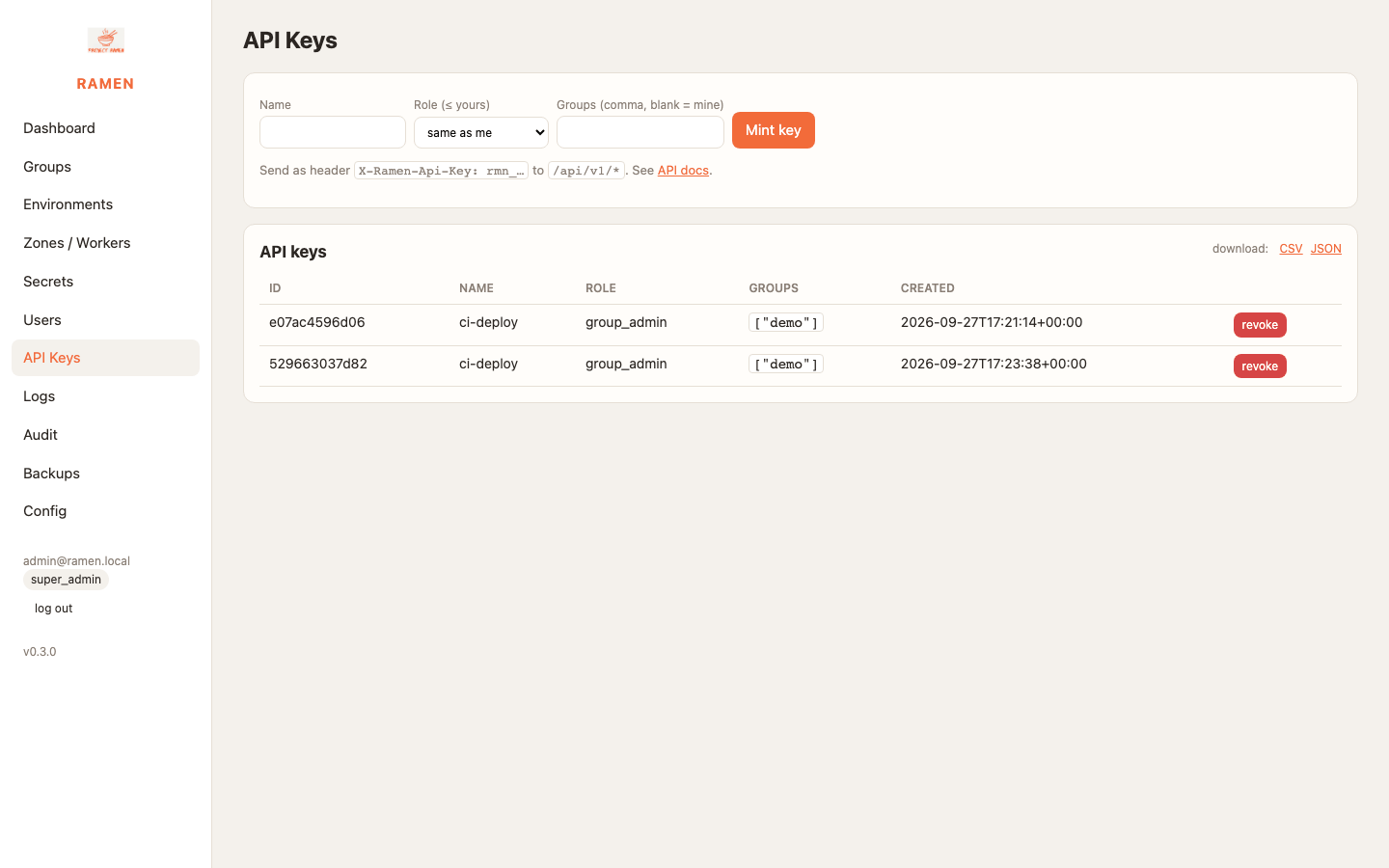
The API and its Swagger page
Everything the console does is a JSON route under /api/v1. The OpenAPI UI is at https://<edge>/api/docs.
Authenticate with an API key, or with a session cookie plus the CSRF header:
curl -s -c c.txt -X POST https://<edge>/login -d email=admin@ramen.local -d password='...' -o /dev/null
CSRF="X-Ramen-CSRF: $(awk '$6=="ramen_csrf"{print $7}' c.txt)"
curl -s -b c.txt -H "$CSRF" -H 'Content-Type: application/json' -X POST https://<edge>/api/v1/api-keys \
  -d '{"name":"ci-deploy","role":"group_admin","groups":["demo"]}'       # 201 {"key":"rmn_..."}
Cheat sheet
One call in full, to copy and adapt:
curl -s -H "X-Ramen-Api-Key: $RMN" -H 'Content-Type: application/json' \
  -X POST https://<edge>/api/v1/groups/demo/environments/prod/deploy -d '{"canary":true}'
The rest, with $U standing for https://<edge>/api/v1 and the same two headers on every call:
| Task | Call |
|---|---|
| Who am I | GET $U/me |
| Zones (super admin) | POST $U/zones {name,provider,region} |
| Groups | POST $U/groups {name,repo_url,ref}, DELETE $U/groups/{g} |
| Environments | POST $U/groups/{g}/environments {name,ref,zones}, PUT/DELETE .../environments/{e} |
| Deploy | POST .../environments/{e}/deploy {canary} gives 202 and an id, then GET $U/jobs/{id} until ok or error |
| Block tools | PUT .../environments/{e}/blocked {blocked:[...]}, then deploy |
| Workers | GET/PUT $U/groups/{g}/zones/{z}/workers {count,size} |
| IP rules, rebalance | PUT .../zones/{z}/ip-rules {cidrs}, POST .../zones/{z}/rebalance |
| Throttle, group and environment | PUT $U/groups/{g}/throttle {redis_url,ip_per_min,token_per_min} |
| Throttle, one item on one zone | PUT $U/groups/{g}/zones/{z}/item-throttle {redis_url,ip_per_min,token_per_min} |
| Secrets | POST $U/groups/{g}/secrets {name,value,env?,zone?}, DELETE .../secrets/{id} |
| MCP keys | POST $U/groups/{g}/mcp-keys {name} returns the key, DELETE .../mcp-keys/{id} |
| Members | POST $U/groups/{g}/members {email,role}, DELETE .../members/{id} |
| Permission requests | POST $U/requests {group,zone,permission,scope?}, POST $U/requests/{id}/approve, /deny, /revoke |
| OAuth clients | POST $U/oauth/clients {name,redirect_uris} |
| Logs | GET $U/logs?group=demo&zone=a&tail=500, and &download=1 for the file. Both names are required |
| Audit | GET $U/audit |
| Backups | POST $U/backups {target}, POST $U/backups/{id}/restore {dry_run,prune,reconcile} |
| Config | GET $U/config, POST $U/config/reload, PUT $U/config/auth |
A CI deploy job
JOB=$(eval $C -X POST $U/groups/demo/environments/prod/deploy -d "'{\"canary\":true}'" | python3 -c 'import sys,json;print(json.load(sys.stdin)["id"])')
for i in $(seq 1 150); do
  S=$(eval $C $U/jobs/$JOB | python3 -c 'import sys,json;print(json.load(sys.stdin)["status"])')
  [ "$S" = ok ] && echo PASS && exit 0; [ "$S" = error ] && { eval $C $U/jobs/$JOB; exit 1; }; sleep 2
done; echo timeout; exit 1
Keep rmn_ keys in CI secrets. An agent operator can use the cloud-ops skills instead.